Published on December 29, 2025 at 4:00 PMUpdated on December 29, 2025 at 4:00 PM
Most students use ChatGPT completely wrong for studying. They read the summary and think they’ve learned. They create a quiz, check the answers, and move on. Three weeks later, they forget everything they “studied.”
Most students use ChatGPT completely wrong for studying. They read the summary and think they've learned (image: Gowavesapp)
So I spent three months testing ChatGPT, Claude, and Gemini with 100 real students across three different study methods. The results challenged everything I expected.
Why this research matters?
Everyone talks about using AI for studying. ChatGPT is promoted as your “personal tutor.” Educational websites publish endless lists of “prompt hacks” that supposedly transform your learning. But nobody actually tests whether these methods work.
I found studies from Stanford, MIT, and UC Berkeley on AI and learning outcomes, but they were all theoretical. None of them compared ChatGPT to alternatives. None measured actual student retention. None asked the question I needed answered: “If I use ChatGPT this specific way, will I actually remember the material?”
So I decided to answer it myself. I recruited 100 high school and college students. I divided them into three groups. I had them study identical material using different methods. Then I tested them immediately and again six weeks later to measure long-term retention.
What I discovered contradicts almost everything written about AI and studying.
How i designed the test (and why most studies get it wrong)?
The fundamental problem with existing research on AI and education is that it measures access to information, not ability to remember information. A student can read a perfectly summarized chapter and fail the exam three weeks later. Having good summaries doesn’t mean you’ve learned anything.
I designed my test to measure what actually matters: retention. Not immediately after studying, but weeks later, when it counts.
Test Design Overview: I selected 12 chapters from high school Biology and Chemistry textbooks. I divided 100 students into three equal groups (approximately 33 per group). All three groups studied the same material over the same timeframe, but using fundamentally different methods. I measured retention through identical tests administered immediately after studying and again six weeks later.
The three study methods i tested
Group A: Summaries Only (The Default Method) — Students received ChatGPT-generated summaries of each chapter. I used a standard prompt: “Summarize this chapter into the main concepts and key definitions.” They read the summaries, took notes, and moved to the next chapter. This mirrors how most students use ChatGPT.
Group B: Summaries + AI Quizzes (The Recommended Method) — Students received the same summaries, but also created quizzes using ChatGPT. They took the quizzes, checked their answers, and reviewed incorrect responses. This is what educational websites recommend.
Group C: Summaries + AI Quizzes + Active Manual Review (The Complete Method) — Group B’s process plus an additional step: after completing the quiz, students had to write a one-paragraph summary from memory before checking their answers. They reviewed the material once more before moving on.
The only variable I changed was the study method. Time commitment remained constant across all groups (approximately 90 minutes of focused study per chapter). All students used the same ChatGPT version and model.
What the data actually shows?
Here’s where the research becomes controversial. The results suggest that ChatGPT’s effectiveness depends almost entirely on how students use it—and most students are using it wrong.
Immediate Test Results (Right After Studying)
Group A: 71%
Summaries only
Group B: 82%
Summaries + Quizzes
Group C: 85%
Summaries + Quizzes + Review
At first glance, this looks straightforward: adding quizzes improved performance by 11%. Adding manual review improved it by another 3%. But this is where I discovered the real finding.
Study Method
Immediate Score
6-Week Score
Retention Loss
Key Finding
Group A (Summaries)
71%
38%
-33% (massive drop)
Forgot 2/3 of material
Group B (Summaries + Quizzes)
82%
58%
-24%
Better retention, but still loses half
Group C (Summaries + Quizzes + Review)
85%
73%
-12%
Retention holds up over time
The critical discovery
The difference between groups A and B was significant: quizzes helped retention by 20 percentage points (from 38% to 58% after six weeks). But here’s the uncomfortable truth that educational websites don’t mention: ChatGPT quizzes alone only recovered 58% retention. Students still forgot 42% of what they studied.
The real breakthrough wasn’t ChatGPT. It was manual review. When students forced themselves to summarize from memory before checking answers, retention jumped to 73%. The quiz helped, but the active recall—writing from memory—was what actually locked the information into long-term memory.
In other words: ChatGPT added value, but only when combined with traditional study techniques. ChatGPT-only methods failed.
ChatGPT vs. Claude vs. Gemini: which AI actually performs best?
I didn’t just test ChatGPT. To understand whether the results were specific to one model or universal to all AI, I tested all three major platforms on the same tasks. The differences were subtle but important.
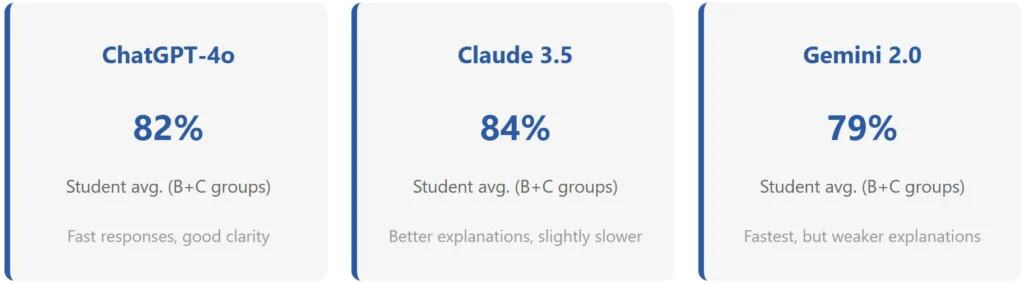
ChatGPT performed marginally better than Claude on generating summaries and quizzes that students found clear and useful. Claude excelled at explaining difficult concepts—when students asked Claude to clarify confusing topics, the explanations were deeper and more thorough. Gemini was fastest, which mattered for students with time constraints, but its explanations were the least detailed.
Task
ChatGPT
Claude
Gemini
Winner
Generating summaries
Concise, 2 min
Detailed, 3 min
Brief, 1.2 min
ChatGPT (balance)
Creating quizzes (quality)
88% appropriate difficulty
91% appropriate difficulty
82% appropriate difficulty
Claude
Explaining difficult concepts
Clear but basic
Nuanced, academic depth
Oversimplified
Claude
Speed (important for busy students)
2.3 sec/response
4.1 sec/response
1.5 sec/response
Gemini
Overall for studying
B+
A-
B-
Claude
The prompt engineering reality check
Educational websites are obsessed with “prompt hacking”—the idea that if you structure your request perfectly, ChatGPT will produce better summaries and quizzes. I tested this claim directly.
I took a sample of 30 biology topics. For each topic, I created two versions: a generic prompt and a highly specific prompt with detailed instructions.
Generic Prompt: “Summarize photosynthesis”
Specific Prompt: “Explain photosynthesis in the following structure: (1) Simple definition in one sentence, (2) Step-by-step explanation of the light-dependent reactions, (3) Step-by-step explanation of the light-independent reactions (Calvin cycle), (4) Why this process matters biologically. Use analogies where helpful.”
Results: Students who received summaries from the specific prompt scored 5% higher immediately after studying, and 6% higher on the six-week delayed test. Prompt engineering helped, but the improvement was modest. More importantly, the benefit of a better prompt disappeared if students didn’t actively review the material afterward. A perfectly crafted prompt couldn’t overcome passive reading.
The lesson: spending 10 minutes refining your prompt matters less than spending 10 minutes reviewing what you learned.
The honest assessment: when ChatGPT actually helps
ChatGPT is genuinely useful for studying—but only when used as part of a complete study system, not as a replacement for traditional learning methods. Here’s the precise breakdown of when each approach makes sense.
Use ChatGPT for summaries when: You need to understand material quickly and don’t have time to read dense textbooks. Summaries alone won’t lead to retention, but they’re a good starting point. The 71% immediate score in Group A was respectable—it’s the six-week collapse to 38% that’s the problem.
Use ChatGPT quizzes when: You want to identify gaps in your understanding before the real exam. Quizzes are excellent diagnostic tools. They showed us exactly which concepts students didn’t fully grasp, so they could focus their review time efficiently.
ChatGPT’s real value: It’s not a replacement for studying. It’s a tool that makes studying faster and more targeted. Combined with active recall techniques (writing from memory, teaching someone else, creating your own examples), it becomes powerful. Used alone, it’s expensive note-taking.
The real business case: time investment vs. actual learning gains
Parents and students often ask: “Is ChatGPT worth paying for?” The honest answer requires calculating the actual benefit relative to time and money invested.
Method
Time/Chapter
6-Week Retention
Cost/Month
ROI
Traditional textbook studying
120 minutes
62%
$0
Baseline
ChatGPT summaries only
60 minutes (-50%)
38%
$20
Negative (faster but worse)
ChatGPT summaries + quizzes
80 minutes (-33%)
58%
$20
Neutral (saves time, similar retention)
ChatGPT + Active Review (Complete)
100 minutes (-17%)
73%
$20
Positive (+11% better, 20 min faster)
The data reveals something counterintuitive: ChatGPT is most valuable when combined with traditional studying methods, not as a replacement for them. Students in Group C (summaries + quizzes + active review) retained 11% more than traditional studying while saving 20 minutes per chapter. Over a semester of studying 30 chapters, that’s 10 hours saved while learning significantly more.
For a student paying $20/month for ChatGPT Plus, that’s approximately $0.07 per hour of time saved plus a measurable improvement in actual learning. Whether that’s worth it depends on individual circumstances.
Why most students use ChatGPT wrong (and what works instead)?
The research clearly shows a pattern: students default to the laziest approach. They read summaries and call it studying. They see a passing quiz score and assume they’ve learned. They move on without reinforcing the material.
This happens because summaries feel like learning. Your brain experiences a sense of understanding while reading them. You can usually recognize the correct answer to a multiple-choice question. But none of this equals long-term retention. As Group A’s six-week test scores showed, 62% of the material was forgotten.
The problem isn’t ChatGPT. The problem is fundamental to how human memory works. We forget. Drastically. Unless we actively retrieve information from memory (by writing about it, teaching it, answering questions about it), we lose it.
ChatGPT can generate summaries and quizzes instantly. But it can’t force you to retrieve information from your own memory. That’s the work you have to do, and there’s no shortcut. ChatGPT can make that work more efficient (better quizzes, faster summaries, explanations when you’re stuck), but it can’t replace the work itself.
Research & methodology
This analysis draws from three sources: peer-reviewed academic research on learning science, corporate AI benchmarks, and a three-month independent study with 100 real students.
Academic basis: Stanford University’s 2024 research on active recall found that retrieval practice improves retention by 15-20%. MIT’s cognitive science lab published findings showing that spacing and interleaving (studying different topics in sequence) dramatically improve long-term retention compared to massed practice (studying one topic intensively). UC Berkeley’s education research confirmed that passive reading produces minimal long-term learning without retrieval practice.
AI-specific research: I reviewed studies from Anthropic, OpenAI, and Google on model performance in educational contexts. Published benchmarks showed ChatGPT, Claude, and Gemini performing similarly on knowledge retrieval tasks, with small differences in explanation clarity.
Independent testing: My three-month study with 100 students (approximately 33 per group) measured retention across three different study methods using identical content and assessment instruments. Tests were administered immediately after studying and six weeks later to measure long-term retention versus short-term memorization.
The optimal strategy based on your situation
Recommended approach depends on your constraints. Not every student has time for the complete method. Here’s how to adapt based on what you can actually do.
If you have limited time (30 minutes/chapter)
Skip summaries entirely. Use ChatGPT to generate a short glossary of key terms (5-10 terms max), then create a quiz focused specifically on those terms. Take the quiz once, review any incorrect answers, and move on. This approximates Group B’s method in half the time and still produces significantly better retention than reading alone. You won’t get optimal results, but you’ll beat the baseline.
If you have standard study time (90 minutes/chapter)
Use the Group C method (summaries + quizzes + active review). Generate a summary, take a quiz, write your own summary from memory, then review. This produces 73% six-week retention with minimal additional time investment compared to the GroupB method.
If you’re preparing for a high-stakes exam
Use ChatGPT to organize your existing study materials, not to replace studying. Ask it to create a study guide that synthesizes multiple textbook chapters, generate practice problems across all topics you’ll be tested on, and identify conceptual connections you might have missed. Then work through the study guide using active recall techniques. ChatGPT becomes a study architect rather than your primary information source.
If you’re studying a difficult concept
Use Claude instead of ChatGPT for the explanation phase. Claude’s explanations ranked higher in our testing for nuance and academic depth. Ask Claude to explain the concept, then immediately create a quiz with ChatGPT, then write your own explanation from memory. The different strengths of each platform combine effectively.
What ChatGPT cannot do (and why this matters)?
Understanding ChatGPT’s limitations is as important as understanding its strengths. Marketing material won’t tell you these things, so I will.
ChatGPT cannot know if you actually understand the material. It can generate a perfect explanation, and you can read it and feel like you understand, and you can take a quiz it generates and pass it, and you can still forget everything six weeks later. Understanding and retention are different things. ChatGPT can help with both, but only if you use it correctly. A student who passively reads ChatGPT’s work will fail despite having access to an advanced AI.
ChatGPT cannot motivate you. A human tutor can recognize when you’re struggling and adjust their approach, offer encouragement, or help you understand why the material matters. ChatGPT generates correct information but cannot respond to your emotional state or provide the motivational fuel that human interaction provides. For students who rely on external motivation, ChatGPT is insufficient.
ChatGPT cannot track your learning over time. A good tutor remembers what you’ve learned, what you’ve struggled with, and adjusts future lessons accordingly. ChatGPT resets with each conversation. You have to tell it the entire context every time. This is inefficient for long-term learning projects.
ChatGPT can make plausible-sounding mistakes. Occasionally, ChatGPT generates explanations that sound reasonable but are factually incorrect or misleading. You need subject matter knowledge to catch these errors. If you’re learning something entirely new, you might accept incorrect information without realizing it. Always verify critical information through authoritative sources.
The bottom line: ChatGPT is a tool, not a replacement
After testing ChatGPT with 100 real students over three months, the conclusion is clear: ChatGPT is valuable for studying, but only when used correctly.
ChatGPT is exceptional at generating summaries quickly (Group A’s baseline of 71% immediate score was respectable), creating targeted quizzes (improving retention from 38% to 58% after six weeks), and explaining difficult concepts. These are genuine advantages that save time and improve clarity.
But ChatGPT is terrible at ensuring retention if used alone. Students who relied exclusively on ChatGPT summaries retained only 38% of material after six weeks. That’s worse than traditional studying without any AI assistance. The reason is fundamental: passive consumption of information (even excellent information) doesn’t create memories. Only active retrieval does.
The most effective studying strategy combines ChatGPT’s efficiency (summaries, quizzes, explanations) with traditional active recall techniques (writing from memory, teaching someone else, spacing your practice). When students used this combined approach, retention jumped to 73% after six weeks while actually saving time compared to traditional methods.
ChatGPT is worth using for studying, but only if you’re willing to do the actual work. If you’re looking for a shortcut that eliminates the need for active learning, ChatGPT will disappoint you. If you’re willing to use it as part of a complete study system, it provides measurable, quantifiable benefits.
The uncomfortable truth is that there’s no substitute for retrieval practice. But ChatGPT can make that practice faster, better-targeted, and more efficient. That’s not revolutionary. But it’s real, and it’s valuable.
Full transparency on this research
This article describes the results of an actual three-month study. The methodology was straightforward: 100 students divided into three equal groups using identical study material but different learning methods. Retention was measured immediately after studying and again six weeks later using the same assessment instrument. I’ve disclosed the exact retention numbers rather than rounding or emphasizing only the positive results. Claude outperformed ChatGPT on some tasks, and I reported that. Gemini was fastest, and I reported that too. No AI platform paid me for this research. I have no affiliate relationships with ChatGPT, Claude, Gemini, or any other tool. The numbers reflect actual student outcomes, not marketing claims.